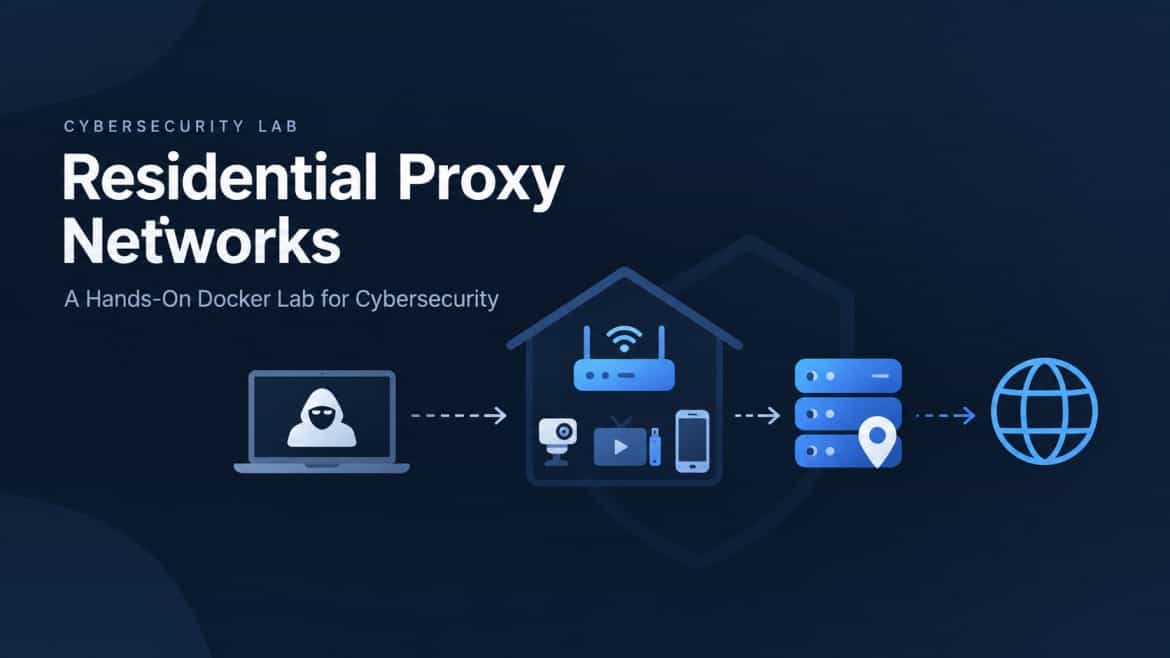
A residential proxy network routes traffic through IP addresses associated with residential internet connections. When devices are enrolled without informed consent, their owners may unknowingly have their bandwidth and IP addresses used by others.
The lab demonstrates proxy enrollment, traffic routing, IP rotation, and defensive network monitoring using six isolated Docker containers and a local target application.
A residential proxy uses an IP address associated with a residential ISP connection, while a data-center proxy uses hosting or cloud infrastructure. Their apparent network origins can therefore differ.
The environment uses Docker Compose, Python, FastAPI, Flask, a minimal SOCKS5 server, tcpdump, and dpkt for packet capture and network-flow analysis.
They can be an investigation signal, especially when unexpected for a device. However, persistent connections are also common in legitimate applications, so duration and traffic volume should be evaluated alongside destination, device behavior, and other telemetry.
No. The documented environment uses simulated IP addresses, Docker containers, and a local Flask target. It is designed to keep the exercise within an isolated lab network.
Use trusted application sources, review bandwidth-sharing terms, avoid pirated software, keep devices updated, and monitor IoT network activity for unexpected connections.
How can an ordinary home router, streaming device, or mobile application become an unwitting part of a cybercriminal's infrastructure?
That was the central question behind today's cybersecurity lab.
I explored residential proxy networks through a hands-on Docker environment designed to demonstrate how proxy enrollment, traffic routing, IP rotation, and network-level detection work.
The lab was based on the FBI's March 12, 2026, public service announcement, Evading Residential Proxy Networks: Protecting Your Devices from Becoming a Tool for Criminals.
Instead of interacting with real proxy services or external targets, I built an isolated environment where each component could be observed and analyzed safely.
A residential proxy network routes traffic through IP addresses assigned to ordinary residential internet connections.
Unlike a typical data-center proxy, which uses hosting infrastructure, a residential proxy makes traffic appear to originate from a consumer internet connection.
This creates a significant security problem when device owners have not knowingly consented to having their bandwidth and IP addresses used.
The person operating the proxy may remain hidden behind the exit device, while the target website records the residential IP address.
A simplified residential proxy architecture looks like this:
The key security concern is that the device owner may be completely unaware that their connection is being used.
The lab guide identifies five enrollment vectors:
Although the initial infection or enrollment method differs, the resulting network behavior can be similar: a device establishes an outbound connection to a controller and maintains that connection.
This is the behavior I wanted to understand at the network level.
The environment uses six containers connected through an isolated Docker bridge network.
| Container | Responsibility |
|---|---|
operator | Simulates the party making requests |
proxy-pool | Registers and manages enrolled exit nodes |
victim-iot | Simulates a compromised IoT device |
malicious-app | Demonstrates an application-based enrollment scenario |
target-web | Records incoming requests and apparent source IPs |
defender | Captures network traffic and analyzes suspicious flows |
The lab uses the 172.28.0.0/16 Docker network.
All simulated request traffic stays inside the lab environment. The target is a local Flask application, and the exit nodes are containers rather than real residential devices.
After entering the project directory, I started the containers with:
docker compose up --build -d
I then checked their status:
docker compose ps
The proxy pool, victim device, operator, target application, and defender provide the core components for the exercises. The malicious application runs as a one-shot enrollment demonstration.
The first exercise demonstrates how a request passes through the simulated residential proxy.
The operator sends a request through an enrolled exit node, and the target application records the apparent source IP.
Run the lab:
bash scripts/run-lab-1.sh
Alternatively:
docker compose run --rm operator demo
The exercise compares three values:
In the documented example, the operator uses 172.28.0.50, while the selected victim-iot exit uses 172.28.0.20.
The target records the exit node's address rather than the operator's address.
This demonstrates how the proxy changes the apparent network origin of a request.
I also examined the target's request history:
curl -s http://localhost:8081/_history \
  | python3 -m json.tool
The history includes information such as the source IP, endpoint, HTTP method, and request headers.
The second exercise explores the network pattern associated with repeated authentication attempts through rotating proxy exits.
The goal is to understand why relying exclusively on source-IP-based rate limiting can be insufficient when requests originate from multiple addresses.
Run the isolated demonstration:
bash scripts/run-lab-2.sh 20
The documented example alternates between two simulated exit nodes:
victim-iot — 172.28.0.20malicious-app — 172.28.0.40The local target's /admin/login endpoint returns HTTP 401 for the simulated requests. The exercise does not authenticate against a real service.
A source-IP-based monitoring system may see requests distributed across different IP addresses, even though they originate from one simulated operator.
This illustrates why defenders need to consider additional signals, including:
The lab also includes a direct-request baseline:
docker compose run --rm operator direct
This allows the apparent source IP from a direct request to be compared with the proxied request.
The third exercise shifts the focus from the operator's traffic to defensive monitoring.
The defender container uses tcpdump to capture traffic and Python with dpkt to analyze network flows.
The demonstration monitors for a long-lived, high-volume connection from a designated suspect host.
The example rule checks for:
Source:       172.28.0.20
Duration:     More than 60 seconds
Transferred:  More than 1,000,000 bytes
These thresholds are intentionally simple and are specific to the demonstration.
After generating traffic, inspect the defender's alert log:
docker compose exec defender \
  cat /var/log/defender/alerts.log
The raw flow records can be examined with:
docker compose exec defender \
  tail -40 /var/log/defender/flows.jsonl
The objective is to identify connections between the simulated victim and the proxy pool, then understand why their duration and traffic volume might warrant investigation.
A long-lived outbound connection is not automatically malicious. Streaming devices, software updates, and legitimate applications can also maintain persistent connections.
Detection therefore requires context.
A practical monitoring system should consider the device's expected behavior, destination, protocol, connection history, and other endpoint or network telemetry before treating an alert as evidence of compromise.
The lab also provided an opportunity to understand how the individual services fit together.
The FastAPI service exposes an operator-facing API for listing and selecting registered exits.
It also maintains a TCP enrollment listener that receives registration messages and periodic heartbeats.
For the demonstration, the registry is stored in memory.
The simulated IoT device runs a minimal Python SOCKS5 server and an enrollment loop.
The enrollment loop connects to the proxy pool, registers the node, and sends periodic heartbeats.
This allows the other components to observe the relationship between enrollment and proxied traffic.
The simulated application demonstrates how an enrollment mechanism could be wrapped in the interface of a free VPN or bandwidth-sharing application.
It illustrates the difference between a user's understanding of an application and the network behavior occurring behind the interface.
The Flask application records incoming requests, including the apparent source IP and selected headers.
Its request history makes the traffic-routing behavior observable without requiring a real website.
The defender captures packets and maintains a flow table containing source, destination, port, timing, and byte-count information.
It uses a basic threshold-based rule to identify flows for further investigation.
The exercises highlight several considerations for network and application security.
Unexpected persistent connections from IoT devices can provide useful investigation signals.
Monitoring should account for each device's normal communication patterns.
IP addresses are useful security signals, but they do not independently establish the identity or intent of a user.
Authentication defenses should combine rate limiting with account-level monitoring and other relevant behavioral signals.
Separating IoT devices from sensitive systems can reduce the potential impact of a compromised device.
Network segmentation also provides more precise monitoring boundaries.
Firmware, operating systems, and applications should be maintained through trusted update channels.
Users should exercise caution with untrusted applications, suspicious downloads, and services whose bandwidth-sharing terms are unclear.
A long-lived connection is an indicator, not proof of malicious activity.
Defenders should correlate network observations with endpoint telemetry, DNS activity, known threat intelligence, and the device's intended function.
After completing the exercises, I removed the Docker environment:
bash scripts/teardown.sh
The documented alternative is:
docker compose down -v --remove-orphans
I then checked the remaining containers, networks, and volumes to verify the lab's cleanup.
This lab connected several cybersecurity concepts that are often studied separately: proxy architecture, device enrollment, traffic routing, source-IP rotation, and network monitoring.
The most important takeaway is that understanding network behavior requires looking beyond the application interface and examining the connections a device establishes.
By building an isolated environment with Docker, Python, FastAPI, Flask, SOCKS5, tcpdump, and dpkt, I could examine these behaviors through observable network traffic rather than relying only on conceptual explanations.
The exercises also reinforced an important defensive principle: network indicators should be investigated in context, and multiple signals are more informative than a single IP address or connection threshold.
Lab scope: This was a defensive and educational simulation using controlled Docker containers and a local target application. It did not involve real residential proxy services, real victim devices, or external targets.