Mikey
HomeProjectsResumeBlogsRoadmapsContact
+977 9825850687
© 2026. Designed by Mikey Sharma. All rights reserved.
Understanding Vector Embeddings in AI: From Basics to Advanced Concepts

Understanding Vector Embeddings in AI: From Basics to Advanced Concepts

By Mikey Sharma•Aug 3, 2026

Share:

Scroll to top control (visible after scrolling)

Frequently Asked Questions

What are vector embeddings?

Embeddings map text, images, or other objects into dense numeric vectors so models can measure semantic similarity and run math like nearest-neighbor search.

How do embeddings power RAG and semantic search?

Documents are chunked, embedded, and stored in a vector index. At query time the question is embedded and similar chunks are retrieved for the LLM to ground its answer.

Which embedding methods should I know?

Classic options include Word2Vec, GloVe, and FastText. Modern contextual models (e.g. BERT-family and vendor embedding APIs) usually perform better for RAG and search.

Understanding Vector Embeddings in AI: From Basics to Advanced Concepts

1. Introduction to Vector Embeddings

Diagram ready to load

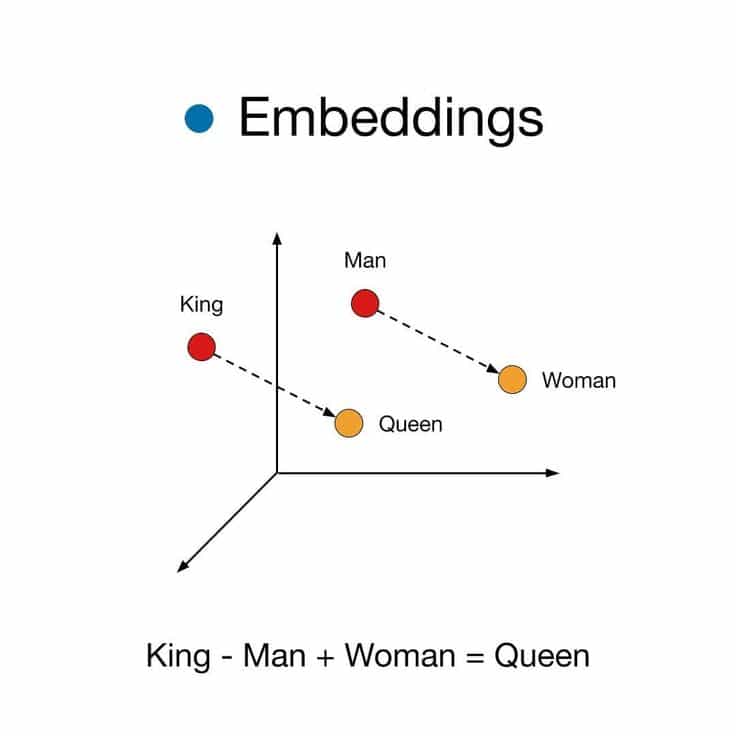
Visual representation of words in embedding space

Vector embeddings are numerical representations of discrete objects in continuous vector space, enabling machines to understand relationships and patterns in data.

Key Properties

  • 🧠 Semantic Understanding: Capture contextual meaning
  • 🔢 Mathematical Operations: Enable vector arithmetic (e.g., king - man + woman ≈ queen)
  • 🗜️ Dimensionality Compression: Typically 100-1000 dimensions
  • 🌐 Transfer Learning: Pre-trained embeddings can be reused across tasks

2. Core Concepts

Embedding Generation Pipeline

Diagram ready to load

Embedding Generation Process

Diagram ready to load

Vector Arithmetic Explained

Diagram ready to load

Semantic Relationships

Relationship TypeExampleVector Operation
GenderKing → Queenv("King") - v("Man") + v("Woman") ≈ v("Queen")
PluralizationDog → Dogsv("Dog") + v("Plural") ≈ v("Dogs")
Adjective FormRun → Runningv("Run") + v("ING") ≈ v("Running")

3. Embedding Techniques Comparison

TechniqueDimensionsContext HandlingTraining SpeedLanguage Support
Word2Vec300Window-basedFastSingle-language
GloVe300Corpus-levelModerateMulti-language
FastText300SubwordSlowUnicode Support
BERT768-1024Full ContextVery SlowCross-lingual

Fig 3.1: Comparison of popular embedding techniques


4. Mathematical Foundations

4.1 Vector Space Model

Diagram ready to load

For word www in vocabulary VVV: w=(x1x2⋮xd)∈Rd\mathbf{w} = \begin{pmatrix} x_1 \\ x_2 \\ \vdots \\ x_d \end{pmatrix} \in \mathbb{R}^dw=​x1​x2​⋮xd​​​∈Rd Where ddd = embedding dimension (typically 300-1024)

4.2 Similarity Metrics

Cosine Similarity: sim(a,b)=a⋅b∥a∥∥b∥\text{sim}(a,b) = \frac{\mathbf{a} \cdot \mathbf{b}}{\|\mathbf{a}\| \|\mathbf{b}\|}sim(a,b)=∥a∥∥b∥a⋅b​

Diagram ready to load

Euclidean Distance: d(a,b)=∑i=1d(ai−bi)2d(a,b) = \sqrt{\sum_{i=1}^d (a_i - b_i)^2}d(a,b)=∑i=1d​(ai​−bi​)2​

Diagram ready to load

4.3 Word2Vec Architecture

Diagram ready to load

Objective Function (Skip-gram): J(θ)=−1T∑t=1T∑−c≤j≤c,j≠0log⁡p(wt+j∣wt)J(\theta) = -\frac{1}{T} \sum_{t=1}^T \sum_{-c \leq j \leq c,j \neq 0} \log p(w_{t+j}|w_t)J(θ)=−T1​∑t=1T​∑−c≤j≤c,j=0​logp(wt+j​∣wt​)


5. Advanced Concepts

5.1 Attention Mechanism

Diagram ready to load

Attention(Q,K,V)=softmax(QKTdk)V\text{Attention}(Q,K,V) = \text{softmax}\left(\frac{QK^T}{\sqrt{d_k}}\right)VAttention(Q,K,V)=softmax(dk​​QKT​)V

Components:

  • ( Q ): Query (current focus)
  • ( K ): Keys (input representations)
  • ( V ): Values (contextual information)

5.2 Dimensionality Reduction Techniques

Diagram ready to load
MethodPreservesComplexityBest For
PCAGlobal( O(n^3) )Linear relationships
t-SNELocal( O(n^2) )Visualization
UMAPBoth( O(n) )Large datasets

6. Implementation Guide

Embedding Dimensionality Selection

Diagram ready to load

Choose embedding dimensionality based on data and task complexity:

  • Use 50–100 dims for small datasets to avoid overfitting.
  • 300 dims suits general NLP tasks.
  • 500–700 dims work better for specialized domains.
  • 768–1024 dims are typical for transformer models like BERT or GPT.

Recommended Dimensions

embedding_dim = {
    'small_vocab': 50-100,
    'general_nlp': 300,
    'domain_specific': 500-700,
    'transformer_models': 768-1024
}

Normalization Process

Diagram ready to load

Normalization Example

import numpy as np

def normalize(vec):
    return vec / np.linalg.norm(vec)
    
# Usage: 
king = normalize(embedding["king"])

7. Challenges & Solutions

Common Issues:

  • 🔥 OOV Problem: Use subword embeddings or [UNK] tokens
  • ⏳ Computation Cost: Apply dimensionality reduction
  • 🎭 Context Ambiguity: Implement contextual embeddings
  • ⚖️ Bias Mitigation: Use de-biasing techniques

8. Future Directions

  1. Multimodal Embeddings
    Unifying text, image, and audio in shared space

  2. Energy-Efficient Training
    Green AI techniques for embedding generation

  3. Dynamic Embeddings
    Real-time adaptation to language evolution

  4. Explainable Embeddings
    Interpretable dimensions and relationships


9. Applications & Case Studies

Recommendation System Flow

Diagram ready to load

Real-World Success Stories

  • 🏦 Banking: Transaction pattern detection
  • 🧬 Biotech: Protein sequence analysis
  • 🛒 E-commerce: Visual search systems

10. Best Practices Checklist

  1. Choose dimension size based on use case
  2. Normalize vectors before similarity comparisons
  3. Monitor for embedding drift over time
  4. Combine static and contextual embeddings
  5. Regularize embedding layers during training